
How to Use Your Calculator (or Desmos!) on the AP® Calc Exam
Sarah Stecher
The AP Calculus Exam has a calculator and non-calculator section. Students will be allowed to use the built-in Desmos app or a handheld graphing calculator on the last 15 multiple choice questions and the first two free response questions. You can learn more about the format of the exam here.
Here are a few tips to share with your students when they are using their calculator:
- Make sure Desmos or your handheld calculator is in RADIAN mode. (This is the default setting on Desmos.)
-
Using a calculator does not mean you should show no work. While you don’t have to do the calculations by hand, always write on your paper the equation you are solving, or the value you are evaluating, including the limits of integration when finding a definite integral.
-
Save functions in your calculator as Y1, Y2, etc. instead of re-typing them each time, especially if you are using the same function multiple times (like in a Free Response Question). On Desmos, name each function with f(x)=, g(x)=, etc.
-
Don’t round intermediate values. Keep several decimal places when finding intersection points or parameters of an equation. Final answers should be rounded to at least 3 decimal places.
-
Be fluent at using your calculator or Desmos to graph a function on an appropriate window, find zeros and intersections, and evaluate derivatives and integrals.
-
Don’t write down calculator keys as supporting justification for an answer. Use words and symbols instead. (Ex: The tangent line approximation for f(3.1) gives an overestimate because f”(3)=-2.275<0 meaning f is concave down near x=3).
If you’re unsure how to do some of the items above on Desmos or on your handheld calculator, fret not! We now have our Ultimate Desmos Guide as well as our guide for using the Ti-84.
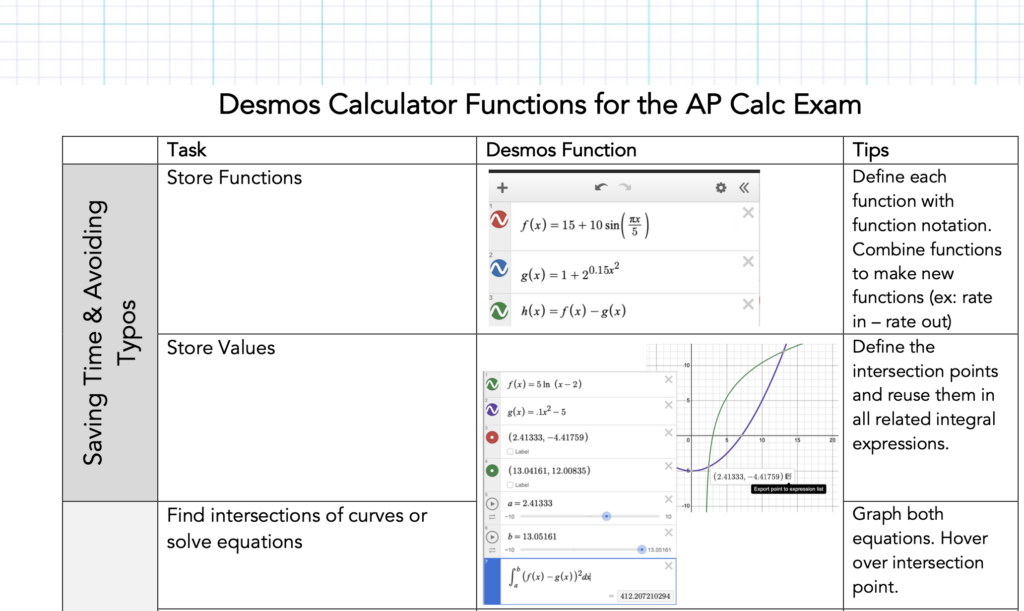
Download the full guides below!
Time to Practice: Calculator Functions Circuit
AP Calc teacher extraordinaire Vicki Carter has written an excellent circuit to help students review all their calculator skills. We’ll be using this in class to make sure students are able to use their calculator flexibly and fluently, without wasting precious time or making careless errors. If you’re unfamiliar with circuits, start in the top left box, then search for your solution in one of the other boxes. When you find it, mark that box as problem #2 and proceed with the question in that box. Continue in the circuit until you end up back at the beginning.
About the Author

Sarah Stecher
Sarah is our “content creator” in every sense of the term. In addition to designing lessons, Sarah writes blog posts, develops resources, and leads Math Medic workshops for schools and districts. She’s also our go-to for AP Calc and Precalc questions from teachers, since that’s what she was teaching before she joined the team. Along with Lindsey and Luke, Sarah was a high school teacher who taught 150+ students every year at East Kentwood High School.