
A Timer That Finally Keeps Me on Track
Guest Author
For the first time in my 25-year teaching career, I finally feel like I have extra time, every single lesson. Let me explain how I got here.
A few months ago, I was preparing to be observed by my department chair. I was planning to teach an AP Statistics lesson on confidence intervals. Because of our school’s rotating schedule, it was going to be a 41-minute period–which is to say, not a lot of time. So, at the start of the lesson, I opened the timer that’s built into our interactive whiteboard and plotted out the following agenda for myself: 20 minutes for the Activity, and whatever’s left for the Debrief, QuickNotes, and Check Your Understanding.
Lo and behold, it worked. I managed to complete all parts of my lesson without feeling rushed and the lesson went smoothly. My biggest takeaway was honestly kind of embarrassing: using timers actually helps. I had previously never used them to stay on schedule, but having that countdown visible made a real difference. I didn’t linger too long during the class activity, and I actually finished the whole lesson before the bell.
This got me thinking: What if I used timers for all the parts of every EFFL lesson?
The problem with this idea was that it wasn’t practical to run up to the board at the end of each segment to reset a new timer for the next one. And even if I intended to do so, I knew myself: I’d forget, and then I’d be left scrambling.
So then I wondered: Could I preset a bunch of timers in advance? This was still not ideal. I’d have to set them up from scratch for each lesson, and then manually start each one the moment the previous one ended.
What I really wanted was one timer that would chime at set points throughout the period. I started imagining a progress bar at the top of the screen, divided into color-coded sections for each part of the lesson. The end product was so clear in my mind. Now: how to build it?
I have a little bit of programming experience but certainly not enough time or expertise to build it from scratch. But I had been playing around with some “vibe coding” lately, so I figured I’d give it a shot. And about an hour later, I had something I was excited to use.
What it does
I created a timer – lessonpacer.com – and it’s built around the EFFL structure. My default setup is Activity (20 min), Debrief + Margin Notes (10 min), QuickNotes (5 min), and CYU (15 min). When you start a lesson, you see all four segments in the progress bar across the top, a big countdown for the current segment, and the total time remaining. When a segment ends, it chimes and moves on automatically. You can see a demo of how it works in the video below.
Making it work in real life
The first version was useful, but a few issues arose pretty quickly once I started using it in class.
One day, I started a lesson a few minutes late and had no way to adjust the timer. So for the next iteration, I added a “Late -1m” button. Press it once and it shaves a minute off the total and scales all the remaining segments down proportionally. Two minutes late? Press it twice. Done.
On another occasion, I felt like I needed more time for the activity and was willing to give up some CYU time for it. That’s when I added draggable borders between the segments. You just grab the divider between two sections and pull it in the direction you want; the two segments on either side adjust automatically.
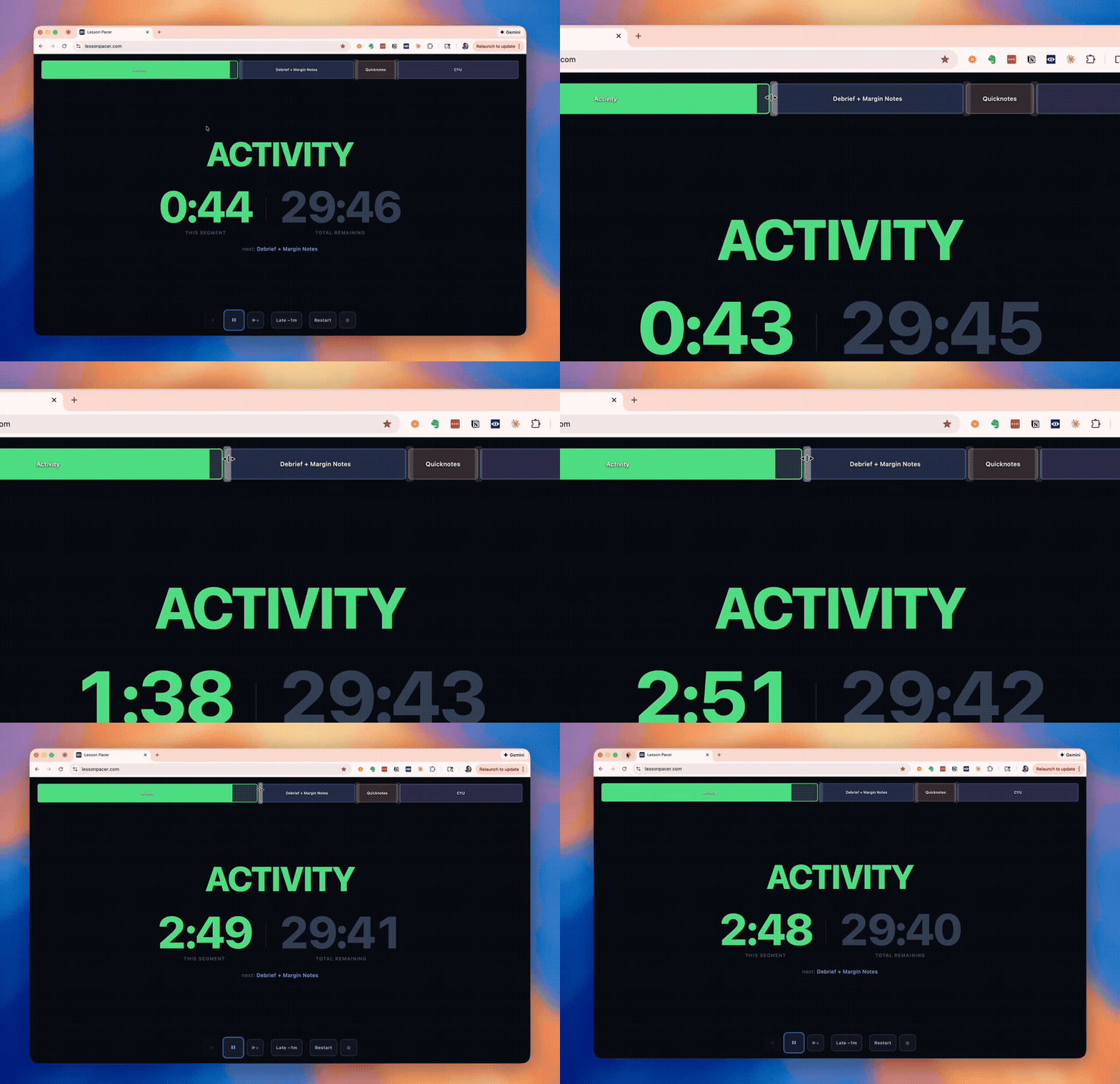
Those two modifications made a huge difference in functionality. Now, I feel like I have breathing room in my lessons because I’m not losing track of time anymore.
How I use it
Setup of the Lesson Pacer is pretty quick. If I’m using my usual lesson structure, I pull it up right at the start of class. If I need to adjust the segments for that day, I spend a couple of minutes setting it up before class. My colleague, Malka Dickman, who has also been using it, has given me some really helpful additional feedback. One of her suggestions was adding a lesson duplication feature, which lets you copy an existing pacer and tweak it instead of starting from scratch. So I added this feature as well. It’s useful when you have similar lesson structures across units.
Try it out
Lesson Pacer is free. No registration or setup is required. I built it because I needed it, and I hope other teachers find it useful too. If you try it and have suggestions, please reach out to freuman@gmail.com. The timer has already gotten better because of feedback from colleagues, and I’d love to keep improving it!
About the Author

Alex Freuman
Alex Freuman has been teaching math for 25 years and currently teaches AP Statistics and AP Computer Science at Nyack High School in the suburbs of New York City. He has been a Math Medic believer since the Stats Medic days, going on six years now. Outside the classroom, Alex runs the Rockland County Chess Club, organizes chess tournaments for his students, and loves incorporating logic puzzles and games into his teaching. He also loves cooking, traveling, and being a dad.